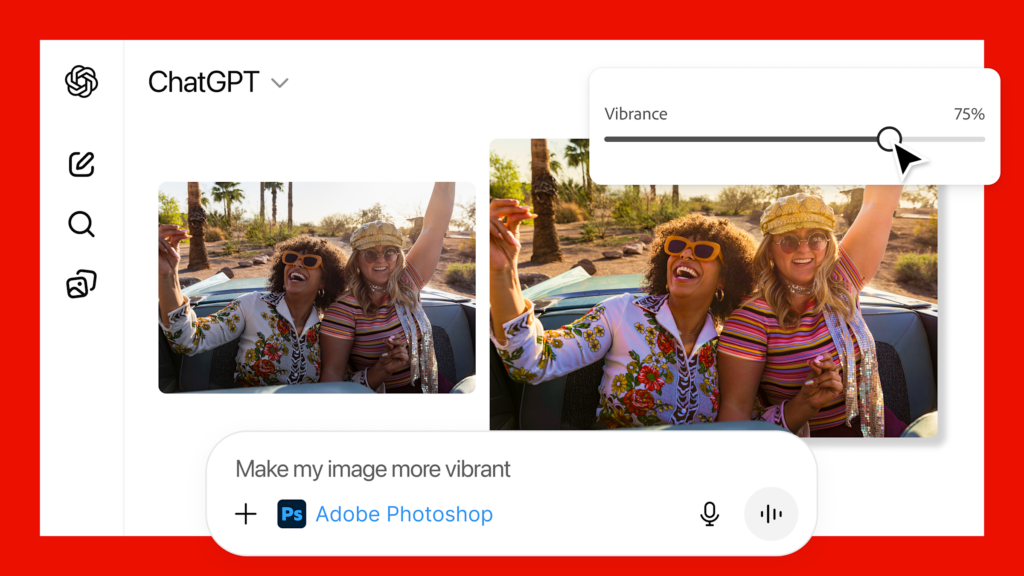
Adobe and OpenAI have announced a powerful integration that brings the core functionality of Adobe Photoshop, Adobe Express, and Adobe Acrobat directly into the ChatGPT conversational interface.
The key takeaway is accessibility. Professional-grade tools that once required specialized knowledge and dedicated desktop software are now available to ChatGPT’s massive user base, directly within the chat window.
- For the Novice: This partnership removes the steep learning curve. Want to blur the background of a photo for a quick social post? Just ask!
- For the Pro: It streamlines your workflow. You can perform quick, context-driven edits and document manipulations without having to switch applications, saving precious time.
Here’s a breakdown of what each integrated app brings to the chat:
The Adobe Express integration turns ChatGPT into a visual design partner. Express is Adobe’s all-in-one content creation app, specializing in templates for social media, flyers, and invitations.
- Key Express Capabilities in ChatGPT:
- Template Generation: Describe the design you need (e.g., “a birthday invitation for a 9-year-old with a space theme”), and Express will surface professional, editable templates.
- Conversational Customization: Ask to swap images, change background colors, fill in specific text, or even add animations—all inside the chat.
Document management often involves tedious, multi-step processes. Adobe Acrobat in ChatGPT brings essential PDF functions to your conversational workflow.
- Key Acrobat Capabilities in ChatGPT:
- Organization: Easily merge multiple PDFs into one, split documents, or organize pages with simple commands.
- Conversion and Compression: Convert files to PDF or compress large documents for easier sharing without losing quality.
- Data Handling: Extract text or tables from documents and even redact sensitive information right in the chat.
One of the smartest features of this collaboration is the ability to move fluidly between the conversational interface and the full power of the native Adobe apps.
If you start an edit in ChatGPT but realize you need more granular control, you can seamlessly open your work in the full Photoshop (Web) or Adobe Express application, picking up exactly where you left off. This ensures that the integration remains a helpful shortcut, not a limiting tool.
Adobe and OpenAI have made this integration available for free to all ChatGPT users globally on desktop, web, and iOS, with Android support rolling out shortly.